With Facebook users, you want to block their friend on Facebook. Here is my tutorial, for you. If there is a way to block your Friend on Facebook, of course there is also a way to unblock it. Using Your mobile phone, just follow my Video tutorial below.
We have many friends who can be friends on facebook. Because Facebook is one of many social media users. So many people become friends. Sometimes we also have friends who are fighting on facebook. Here's where you can block or block.
Are you one, with millions of users using Facebook? Every day you're online, You're probably talking to people on facebook. Different classes or types of people. There is kindness, evil, and you can not understand the behavior, the person you are talking to. Maybe someone has broken you on Facebook. In my Tutorial, I will explain how to Block a Facebook user so that you can not connect your Facebook account. I used the Facebook Lite application, Using a mobile phone or android phone, Block the person you want.
To block Another person on Facebook, Using the FB lite application.
On your mobile phone, go to the FB lite application and log in.
In your account click on the search bar and search for your desired person to block.
Hit your want to block. and in his profile you click the three dot on the upper right side of the screen.
And select block. And there's a message for you. Read if you are sure? Then click on Block again, if you are sure.
With Facebook tutorials you'll know how to OFF or Disable Facebook video autoplay in your FB Lite Application. I use android phone to stop autoplay YouTube . Since you're connected to WIFI, video autoplay that appears on your screen will take the play, to stop it, read my tutorial below or watch on my Video tutorial.
First you go to your FB lite application on your mobile divice.
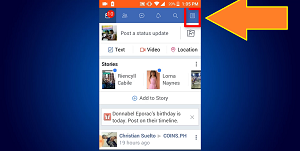
You login, then you click the menu on the right side of the screen.
Look for the setting, then click on it.
In the settings you find media and contacts and select Auto play video.
Hi guys, do you want your friend does not know Facebook, what day is your birthday.I will tell you how to do it, using your mobile divice or your android phone.
Do you want to change your Facebook name. I'll show you how, with android phone. Change FB name is very easy, using mobile phone. Here's the way, how to change it.
You go to the FB Lite Application.
Press Menu at the top right of your andriod phone.
Look for Setting and click here. Then select Account Settings.
In the Account Settings you click General.
In general you select the Name.
Now you can change your name on Facebook.
NOTE:Before you change your name you need to check it. Because when you change it, you want to change it again. You need to wait 60 days, before you can change it again.
In this Facebook tutorial you'll learn how to Change your Facebook account password. Step by step using the Facebook Lite app. You can change or reset your Facebook password using mobile phone or android phone.
Go to your Facebook lite application.
On the mobile screen at the right height. Press Menu.
In the menu select the setting and when in settings select the account setting.
Press security and login. In security login, press Change password
To change the password, enter your current password and enter your new password, and retype the new password. After that, press Save changes.
Connect your mobile phone in your pocket WiFi or data connection. When connected you on the Internet. You go in the menu and you click the Internet browser. In browser type www.youtube.com and click the profile image in the upper right side of the screen. And Click the creator studio.
With creator studio dashboard. Below YouTube channel name you click the view channel. And your main channel. In the search bar above copy your channel ID.
You make new tab, to create a new tab clicking the positive sign in height of the screen. You type socialblade.com
there appear pop up Windows, click the com. On the upper right side of the screen in the search bar paste channel ID and click enter. You will see the record your YouTube channel, total grade of socialblade is c +. subscribers rank I was 5.9 m, video rank is 6.3 m and socialblade rank of my channel is 1.5 m. The views for the last 30 days are 19,767 and subscribers for the last 30 days was 76. You will know well as you earn for a month and for a year. My estimate monthly earnings are 5 $ to 79 $. and my estimate yearly earnings are 59 $ to 949 $.
know you also have some of the average subscribers and view a day. my subscribers daily is 3 and views daily is 659. see also the graph of monthly views and monthly subscribers. And many other details of your YouTube channel.
If you have questions. Comment just below and if satisfied you to my channel click subscribe button for new tutorials.
If you want more Tutorials Go to my YouTube Playlist: YouTube Tutorials
Many of us love to selfie using mobile phone and upload to Facebook. But we also directly on the Facebook app installed on our cellphone. Of course, one of the good reasons why we upload our pictures is to avoid losing. If we had pictures in the picture frame or in the home-based albums. Now it's so online. I'll show you how to upload to a Facebook album using mobile.
Click on the Facebook app.
Go to the top right of the application. Press three slashes.
Find and touch Photo.
Go to the Album that wants to add an image.
Within the Album. Touch the camera icon.
Select Folder where you saved the uploaded image.
Within Folder Touch the image you want to upload.
Press Done and wait for download to finish.
Post message if you like. Then click on the comment.
Hit the share button on the bottom right. Then you can share where you want. You can share it with your group, your page, and your friends.
I made a video tutorial if I wanted to watch it. You press the subscribe button for more videos, Thanks.
To all andriod mobile user here the procedure to update your messeger. This process are not only on messeger, alike other app you can update by this procedure.
First go to playstore. You'll see in the logo app and click.
Find the at the left corner of your mobile screen.
Click App and games > My app and Games.
Under my app and games, we have a three menu the Updates, Installed and Library. Choose Install and find the Messeger. Click the app and updates to install the new one.
Note; If you dont see update beside the messeger app, your application are allready update.
Wait the install process and your done. Now you have a new Messeger application.
In this tutorial i will show you how to erase or remove post on Facebook. If you don't know how to remove your post in Facebook, Here the simple procedure to erase the post.
If you have a post and you want to delete.The first thing you do is click the profile name on the top of screen. But if you don't login to your account, Login first by using your Email or number and password. On the profile page find the post you want to delete, scroll down the page and find it. In the post put the arrow mouse on V ship located on the right of screen post and click.
On pop up window choose find Delete and click, to erase your post permanently. Another pop up windows upper, said "This post will be deleted and you won't be able to find it anymore. You can also edit this post, if you just want to change something." and click either edit post or delete post.